Blog ›
OCR a PDF on Mac: make a scanned PDF searchable
To OCR a PDF on a Mac you need a tool that recognises the text in the page images and saves it as an invisible layer behind them, so the scan looks the same but can be searched, selected and copied. Preview cannot do that. The free route is OCRmyPDF in Terminal; the easy routes are apps like PDF Agents for Mac, PDF Expert or Acrobat Pro, which do it on your Mac without uploading the file. Here is each one, and how to tell whether your PDF needs OCR at all.
Does my PDF need OCR?
Open it in Preview and try two things:
- Drag across a line of text. If the words get highlighted one by one, the PDF has text. If a rectangle appears instead, it is a picture of text.
- Press Command-F and search for a word you can see. No results means no text layer.
Scans from a copier, PDFs made from phone photos and many faxes have no text layer. PDFs exported from Word, Pages or a website do; running OCR on those gains nothing.
Can Preview or Live Text do it?
Partly. On a recent macOS, Live Text can recognise text in images, and in some scanned PDFs you can select and copy words in Preview. That helps when you need one sentence. It does not change the file: Spotlight, other apps and the person you send it to still get a PDF without text, and searching across many pages is unreliable. To get a searchable PDF, use one of the tools below.
Free: OCRmyPDF in Terminal
OCRmyPDF is a free, open-source tool that adds a text layer and keeps the page images as they were. It runs on your Mac, so nothing is uploaded.
- Install Homebrew if you do not have it.
- In Terminal, run
brew install ocrmypdf. - Run
ocrmypdf scan.pdf scan-searchable.pdf. Add-l deu(German),-l fraand so on for other languages; English is the default.
If the PDF already has text on some pages, OCRmyPDF stops and says so; --skip-text processes only the pages without text. It is the most reliable free option, but you need to be comfortable with Terminal.
PDF Agents for Mac: OCR on your Mac, one file or a whole folder
PDF Agents for Mac is our app. Its OCR agent uses Apple's own text recognition, the same engine as Live Text, on your Mac:
- Add the folder with your scans as a vault and select the PDF.
- Choose OCR: Make It Searchable from the Agents menu. Leave Languages empty to detect the language, or enter codes such as en, es.
- Run it. A searchable PDF and a .txt file with the recognised text are saved next to the original, which is not changed.
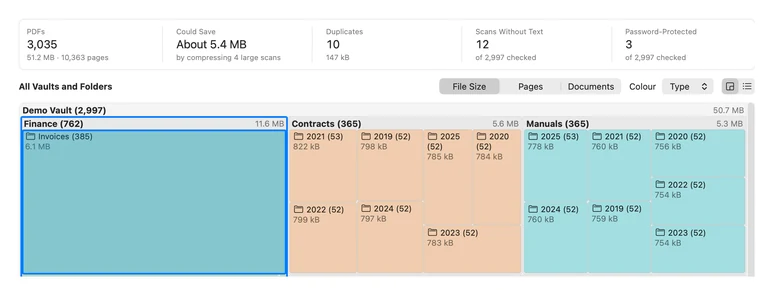
It has no page limit and works on a whole folder at once. The PDF Map shows how many of your PDFs are scans without text, and its recommendation hands them to the OCR agent for you to review. If a PDF already has text, the agent says so instead of redoing it. OCR is free, and it also works offline.
Other apps with OCR
- Adobe Acrobat Pro ($19.99 a month on an annual plan): Scan & OCR, with options to correct suspected errors. Acrobat Standard does not include OCR. See what Acrobat costs.
- PDF Expert: OCR is in the paid plan (about $80 a year).
- PDFgear: a free app with OCR. Check results on your own scans.
No install: in the browser
The pdfagents.ai OCR tool runs in Safari or Chrome. The recognition happens in the browser tab, so the scan is not uploaded. It reads English and German and handles up to 30 pages per file; downloading the searchable PDF is free. Scan with your phone and make it searchable walks through it from the photo to the finished PDF.
Getting good OCR results
- Scan at 300 dpi. Lower makes small print and numbers unreliable; higher only makes files bigger.
- Straight and flat. Rotate pages the right way up first (Rotate); curled pages from a book come out worse.
- Set the language when the tool asks. Accents and umlauts come out wrong under the wrong language.
- Check the numbers. OCR confuses 0 and O, 1 and l, 5 and S. Before you rely on an amount or an account number, compare it with the image.
- Handwriting is hit and miss in every tool.
Questions people ask
Can Preview OCR a PDF on a Mac?
Not in the sense of saving a searchable PDF. Live Text can let you select and copy text in some scanned pages in Preview, but it does not add a text layer to the file, so search in other apps and Spotlight still finds nothing. For that you need an OCR tool.
What is the best free way to OCR a PDF on a Mac?
OCRmyPDF, a free open-source command-line tool: install it with Homebrew (brew install ocrmypdf) and run ocrmypdf scan.pdf scan-searchable.pdf in Terminal. It adds an invisible text layer and keeps the page images as they were. If you would rather not use Terminal, PDFgear is a free app with OCR.
How do I check whether a PDF already has text?
Open it in Preview and try to select a word by dragging across it, or press Command-F and search for a word you can see on the page. If nothing is selected or found, it is a scan without a text layer and needs OCR.
Does OCR change how the PDF looks?
A good OCR tool keeps each page image exactly as it was and puts an invisible layer of text behind it, so the PDF looks the same but becomes searchable. Some tools re-compress the images, which can make the file smaller and slightly softer.
Is OCR on a Mac private?
Tools that run on the Mac (OCRmyPDF, PDF Agents for Mac, PDF Expert, Acrobat's desktop OCR) do not upload the file. Online OCR sites do, so avoid them for bank statements, IDs, medical or legal papers.
Make every scan on your Mac searchable
PDF Agents for Mac finds the scans without text and makes them searchable with Apple's text recognition, on your Mac and offline. Free, no page limits.
PDF Agents for Mac →