Blog ›
Adobe Acrobat alternatives for Mac, and what Acrobat Pro costs
Adobe Acrobat Pro costs $19.99 a month on an annual plan in the US, $239.88 a year if you pay up front, or $29.99 a month without a yearly commitment. Most people who pay that use three or four of its features: editing a line, signing, filling forms, maybe OCR. Each of those has a cheaper or free alternative on a Mac. Below are Acrobat's prices, what each Acrobat job can be replaced with, and the cases where Acrobat is still worth it.
Disclosure: we make PDF Agents for Mac, one of the alternatives below.
What does Adobe Acrobat cost in 2026?
Adobe's US list prices for individuals in November 2026:
| Plan | Annual plan, billed monthly | Annual, paid up front | Month to month |
|---|---|---|---|
| Acrobat Standard | $14.99 / month | $179.88 / year | $24.99 / month |
| Acrobat Pro | $19.99 / month | $239.88 / year | $29.99 / month |
| Acrobat Studio | $24.99 / month | $299.88 / year | $34.99 / month |
- Standard edits text and images, signs, fills and converts. It leaves out OCR for scans and redaction.
- Pro adds OCR, redaction, comparing files and the advanced tools.
- Studio adds Adobe's AI Assistant and Adobe Express.
- The annual plan billed monthly is a one-year contract. Leaving it early can cost a cancellation fee; read the terms before you sign up just for one job.
- No lifetime licence. Acrobat Pro 2024 (also sold as Acrobat Classic) is paid once but covers three years, without the cloud features.
- Acrobat Reader stays free: it opens, fills, signs and comments on PDFs.
Prices change, and Adobe often runs discounts for the first year; check adobe.com before you decide.
What replaces each Acrobat feature on a Mac?
| Acrobat job | Free on a Mac | Paid alternative | PDF Agents for Mac |
|---|---|---|---|
| Fill in a form | Preview, Acrobat Reader | PDF Expert | Yes |
| Sign a PDF | Preview, Acrobat Reader | PDF Expert | Yes |
| Change existing text | PDFgear, LibreOffice Draw | PDF Expert | One line at a time |
| Merge, split, reorder, rotate pages | Preview | PDF Expert | Yes |
| OCR a scan | Limited | PDF Expert (paid plan) | Yes, on your Mac |
| Redact | Preview (boxes you draw) | PDF Expert | Yes, and it finds names, emails and account numbers for you |
| PDF to Word, Excel or PowerPoint | Limited | PDF Expert | Yes |
| Compress | Preview (one fixed setting) | PDF Expert | Yes |
| Compare two versions | None | Acrobat Pro | Yes |
| Create fillable forms | LibreOffice Writer | Acrobat, PDF Expert | No |
| Send for signature with tracking | None | Acrobat Sign, DocuSign | No |
| Preflight, PDF/UA accessibility checks | None | Acrobat Pro | No |
The alternatives in short
Preview (free, built in)
Already on your Mac. Fills forms, signs with the trackpad or camera, redacts with Tools → Redact, and merges, reorders, rotates and deletes pages. It cannot change existing text or OCR a scan into a searchable PDF. How to edit a PDF on Mac shows every Preview tool.
PDFgear and LibreOffice (free)
Both edit existing text at no cost: PDFgear in a Mac app built for PDFs, LibreOffice Draw by opening the PDF as text boxes, which suits simple documents. LibreOffice Writer can also build a fillable form and export it as a PDF.
PDF Expert (about $80 a year, or about $140 once)
The closest all-round Acrobat replacement on a Mac: text editing that reflows, annotation, forms, signing, page tools, and in the paid plan OCR and redaction. The lifetime licence is for the Mac only. Best PDF editor for Mac compares it with the others.
PDF Agents for Mac (free)
PDF Agents for Mac replaces the Acrobat jobs that are about processing documents: OCR, redaction that finds personal data for you, PDF to Word and Excel, compress, compare, sign, fill, merge and split, on one file or a whole folder at once. Everything runs on your Mac and nothing is uploaded. It is free, with every agent included, and there is no subscription.
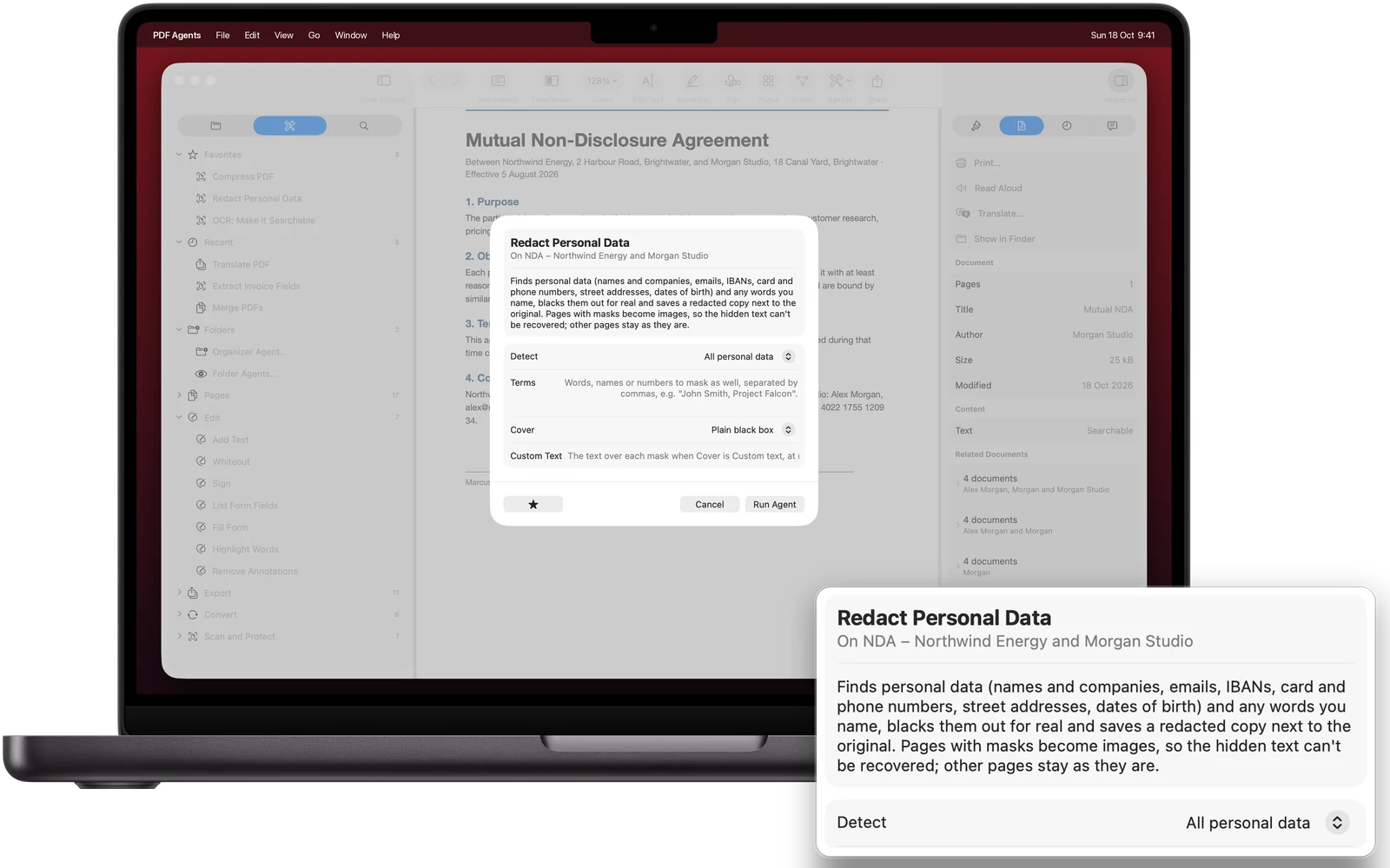
What it does not replace: rewriting paragraphs (Edit Text changes one line at a time), creating form fields, sending documents for signature with tracking, and Acrobat's print and accessibility checks.
Online PDF sites (free tiers, then a subscription)
Smallpdf, iLovePDF and similar sites cover many Acrobat jobs in the browser. They upload your file to their servers and limit free use; their paid plans are subscriptions too. The pdfagents.ai browser tools run in the tab instead, so the file is not uploaded, and downloads are free.
When is Acrobat still worth it?
- You build complex fillable forms, with calculations or scripts.
- You prepare PDFs for print (preflight) or must meet accessibility rules (PDF/UA) in public-sector work.
- You send contracts for signature and need Adobe's audit trail, reminders and tracking.
- Your team, your clients or your industry exchange Acrobat-specific files and expect you to use it.
If none of those is you, the money is probably better spent elsewhere. A useful test: list the Acrobat features you used in the last three months, and look them up in the table above.
Questions people ask
How much does Adobe Acrobat Pro cost?
In the US, Acrobat Pro costs $19.99 a month on an annual plan billed monthly, $239.88 for a year paid up front, or $29.99 a month without a yearly commitment (Adobe's list prices in November 2026). Acrobat Standard is $14.99 a month on the annual plan and Acrobat Studio $24.99.
Is there a free alternative to Adobe Acrobat on Mac?
For most jobs, yes. Preview, built into every Mac, signs, fills forms, redacts and edits pages; Acrobat Reader is free for viewing, filling, signing and comments; PDFgear and LibreOffice Draw edit existing text for free. OCR, PDF to Word and finding personal data to redact are where free options thin out.
Can I buy Acrobat without a subscription?
Not as a lifetime licence. Adobe sells Acrobat Pro 2024, also called Acrobat Classic, as a one-time payment that covers three years and has no cloud services. After that you buy again or move to a subscription.
What is the best Acrobat alternative for Mac?
It depends on what you use Acrobat for. PDF Expert is the closest all-round replacement for editing. PDF Agents for Mac (free) covers OCR, redaction, Word and Excel export, signing and batch jobs without uploading files. If you only fill and sign, Preview is enough.
When should I keep Acrobat?
Keep it if you create complex fillable forms, need preflight or accessibility checks for print or public-sector work, send documents for e-signature with Adobe's tracking, or work with a team whose files and processes are built around Acrobat.
Replace Acrobat's everyday jobs for free
PDF Agents for Mac: OCR, redaction, Word and Excel export, compress, compare, sign and fill, on files and whole folders. No subscription, nothing uploaded.
PDF Agents for Mac →