Blog ›
Bank statement converter: PDF to Excel or CSV, no upload
A bank statement converter turns the PDF statements your bank gives you into rows in Excel or a CSV file: one row per transaction, with date, description, debit, credit and balance. The quickest free way is often your bank's own CSV download. For PDFs, use a converter that runs in your browser, such as Bank Statement Analysis, so the statements are never uploaded. Below: the options compared, how to convert step by step, and how to check that nothing went missing.
Disclosure: pdfagents.ai and Bank Statement Analysis (bankstatementanalysis.com) are made by the same small team. We say below what each of them does not do.
Before you convert: check your bank's own download
Most US banks let you download your transaction history from online banking as CSV, Excel, or a QuickBooks or Quicken file (QBO, QFX). Look for Download or Export on the account's activity page. It is free, and the numbers are exact because nothing is read from a PDF. The limits: banks often keep only a window of history online (from a few months to a couple of years), the descriptions can be shorter than on the statement, and closed accounts usually have nothing left to download. That is when you need a converter.
Why converting bank statements is harder than other PDFs
A general PDF-to-Excel tool sees a statement as a grid and copies it. Statements break that in a few ways:
- Descriptions wrap onto a second line, which a table tool turns into a second row with no amount.
- Debits and credits sit in separate columns, or in one column with a minus sign, or with "CR" after the number, depending on the bank.
- Summary boxes look like transactions: "Total deposits $8,420.00" ends up as a row and doubles your income.
- Page breaks repeat the header and sometimes split a transaction.
- Dates have no year ("10/27"), which matters for a December to January statement.
A bank statement converter knows these patterns. The good ones also check the result against the balances printed on the statement.
Bank statement converters compared
| Converter | Uploads your statement? | Cost | Scanned statements | Checks the totals | Extras |
|---|---|---|---|---|---|
| Your bank's CSV download | No | Free | Not needed | Exact by design | QBO/QFX at many banks |
| Bank Statement Analysis (ours) | No, runs in the browser | Free, no account, no row limit, up to 24 statements at once | Not yet | Yes, against each statement's opening and closing balance | Categories, charts, recurring payments, the 12/24-month view a bank-statement lender uses |
| PDF Agents for Mac, Finance Agent (ours) | No, runs on the Mac | Free | OCR agent included | Yes, every statement to the cent | Whole folders, matches invoices and receipts to payments, Excel and CSV export, works offline |
| pdfagents.ai PDF tables to Excel (ours) | No, runs in the browser | Free | OCR first | No | A general table tool: one sheet per table; wrapped descriptions need tidying |
| Online converters (BankConv, Nanonets, bankstatementconverter.com and others) | Yes | A few free pages, then plans | Many do, with OCR | Some do | QuickBooks (QBO), QIF and other accounting formats |
| Excel's Get Data from PDF | No | Microsoft 365 | No | No | Windows only; not in Excel for Mac |
Online converters' terms are from their own pages in November 2026 and change often. BankConv, for example, says the first 5 pages are free with no sign-up and that files are deleted after 24 hours.
How to convert a bank statement to Excel without uploading it
With Bank Statement Analysis, in Safari, Chrome, Edge or Firefox:
- Download the statements as PDFs from online banking. Use the PDF the bank produced, not a scan or a phone photo: those are not supported yet.
- Drop them on the page, one to 24 months at once. The page reads them in your browser; nothing is sent anywhere.
- Check the balance line under the table. It says how many statements add up, for example "12 of 12". A statement that does not add up is named, so you know which file to look at.
- Fix categories if you want them. Each row gets a category from the description; change one row and every row from the same payee follows.
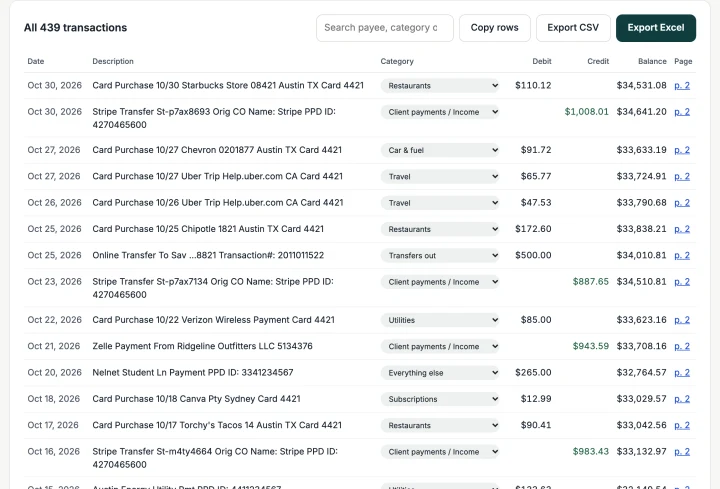
- Export Excel or CSV. Debits and credits come out as separate number columns, dates as real dates, and each row says which statement and page it came from.
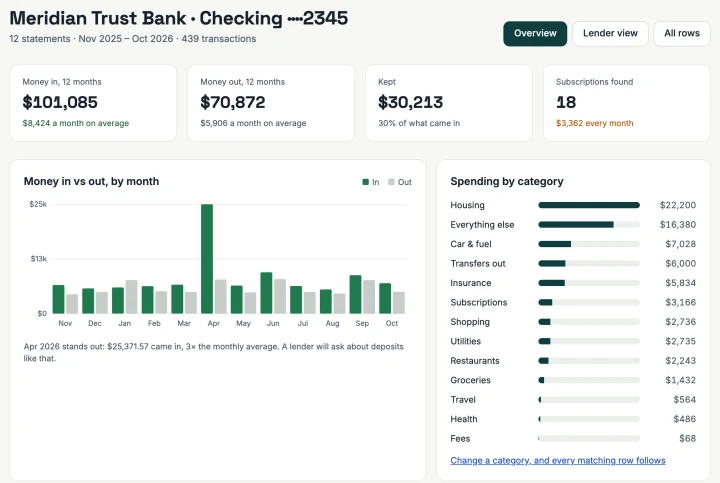
The same page shows money in and out by month, spending by category, payments that repeat every month, and, for self-employed people applying for a bank-statement mortgage, the 12- and 24-month deposit averages a lender works from. It is an estimate for your own preparation, not a lender's decision.
Converting many statements, every month
Bookkeepers and freelancers who convert statements for several accounts every month are better served by a desktop app. The Finance Agent in PDF Agents for Mac reads every statement in your folders, checks each one to the cent, matches invoices and receipts to their payments, and exports the selection as Excel or CSV. It runs on the Mac and works offline. It is free and is an overview of your money, not accounting software or tax advice.
When an upload converter is the better choice
Being honest about our own tools: an online converter makes more sense when
- the statements are scans or photos and you need OCR built in, or
- you need a QuickBooks (QBO) or Quicken file rather than Excel or CSV, and your bank no longer offers that download.
If you do upload, black out the account number first. How to redact a bank statement shows how, and the Redactor does it in the browser.
How to check the converted statement
- In the spreadsheet, add up the credit column and the debit column for one statement.
- Take the opening balance printed on the statement, add the credits, subtract the debits.
- The result must equal the printed closing balance, to the cent.
If it does not, look at page breaks, wrapped descriptions and summary boxes first. Also compare the number of rows with the statement's own count of deposits and withdrawals, if it prints one. Do this before the numbers go into a loan application or a tax return.
Questions people ask
What is the best free bank statement converter?
First check whether your bank offers a CSV or Excel download in online banking; that is free and exact. For PDF statements, Bank Statement Analysis (bankstatementanalysis.com) converts them to Excel and CSV for free in the browser, with no upload and no row limit, and checks each statement against its printed opening and closing balance. It does not read scanned statements yet.
Is it safe to upload bank statements to an online converter?
It is a risk you cannot check. A statement shows your account number, income, landlord, doctor and spending. Most online converters upload the PDF to their server and promise to delete it later. Converters that run in the browser read the file on your own computer, so nothing is sent.
How do I convert a bank statement to Excel on a Mac?
Excel for Mac cannot import PDFs. Use your bank's CSV download, a converter that runs in Safari or Chrome such as Bank Statement Analysis, or, for many statements at once, the Finance Agent in PDF Agents for Mac, which reads statements on the Mac and exports Excel or CSV.
Can I convert a scanned bank statement?
Only with a converter that does OCR. Scans and phone photos have no text layer, so a text-based converter finds nothing. Upload converters with OCR handle them; or run OCR first on your own computer and then convert, and check the totals carefully, because OCR misreads digits.
How do I know the conversion is right?
Add up the converted rows and compare: opening balance plus credits minus debits must equal the closing balance printed on the statement. If it does not, a transaction was missed or misread, often on a page break or in a summary box mistaken for a transaction.
Convert your bank statements, without uploading them
Bank Statement Analysis turns PDF statements into Excel and CSV in your browser, checks the totals and shows where the money goes. Free, no account.
Open Bank Statement Analysis →