Blog ›
Extract data from PDF invoices automatically: AI invoice scanners vs. a pattern-based tool that runs on your device
Typing invoice numbers and totals into accounting software is the kind of work everyone wants to automate and nobody wants to get wrong. “AI invoice scanner” is now a crowded category. Here is what those tools do, where they fail, and a simpler approach that extracts the key fields from most invoices without a model and without the invoice leaving your computer.
What an invoice scanner has to find
For bookkeeping, the fields are predictable: invoice number, invoice date, due date, net, VAT, gross total, currency, the supplier's IBAN and BIC, their VAT ID, and the contact details. Line items matter for some workflows and not for others. The layout varies wildly, but the labels do not: “Invoice no.”, “Rechnungsnummer”, “Total”, “Gesamtbetrag”, “IBAN” appear next to the values on nearly every invoice.
Two ways to do it
Models
AI invoice scanners (and ChatGPT with a PDF) read the whole document and output JSON. They cope with unusual layouts and handwriting, they infer missing labels, and they sometimes infer things that are not there: a due date that is a guess, a total that is the subtotal, a swapped VAT ID. The cost is per document, and the invoice is uploaded to the provider, which for supplier invoices with bank details is a data-protection question in itself.
Patterns
A pattern-based extractor looks for the labels and the shapes of the values: an IBAN has a country code and check digits, a date has a date's shape, a total follows the word total. It never invents a value; if a field is not labelled in a way it knows, the field stays empty and you see that. It runs in milliseconds, needs no AI model, and can run entirely on your device. It fails on photographed invoices without OCR and on layouts that put labels far from values.
The browser tool
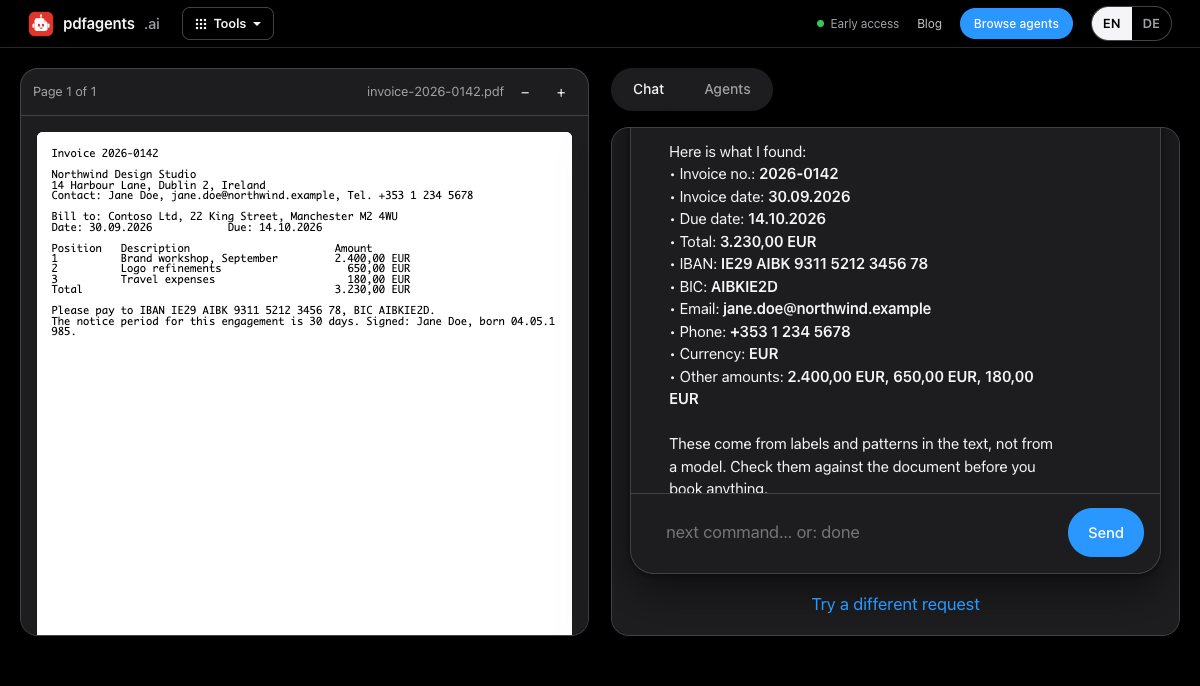
pdfagents.ai's Extract key fields is the second kind. Drop the invoice and say pull the invoice number, date and total: it lists what it found with the values, and offers the same as JSON and CSV. Labels are recognised in English and German. For a scanned invoice, say make it searchable first; the OCR runs in the browser too.
Checking the output, whichever tool you use
- Net + VAT = gross. If the three numbers were extracted, they must add up. If they don't, one is the wrong line.
- The IBAN's check digits. A valid IBAN passes a checksum; a mis-read one almost never does. Any banking app will refuse it, which is the moment to compare with the PDF.
- Due date after invoice date. Trivial, and catches the swapped-field error.
- Supplier changed bank details? Compare with the last invoice from them. Invoice fraud works by changing the IBAN; extraction makes the comparison easy.
Batch work
Browser tools handle one file at a time. For hundreds of invoices a month, use the pattern-based approach as a script (Python's pdfplumber plus the same regular expressions) or an invoice-processing service that integrates with your accounting software, and keep the four checks above as automated tests rather than as a habit.
Questions people ask
How can I extract data from a PDF invoice without uploading it?
Drop the invoice on pdfagents.ai and say “pull the invoice number, date and total”. The key fields are found from labels and patterns in English and German and offered as JSON and CSV, in the browser, without uploading the invoice, and the download is free. Scans need OCR first.
Are AI invoice scanners accurate?
On clean, common layouts, very. Their characteristic failure is confident invention: a plausible due date or total that is not on the document. Validate net + VAT = gross, check the IBAN checksum, and compare bank details with the supplier's previous invoice.
Can I extract tables and line items from an invoice?
Yes, with a table extractor: pdfagents.ai's PDF tables to Excel or CSV finds the line-item table from its aligned columns and stores amounts as real numbers. Check the sum of the lines against the printed total.
Extract the key fields from an invoice
Drop the invoice, say “pull the invoice number, date and total”, review the list, download JSON or CSV. Nothing is uploaded. Downloads are free.
Extract invoice data →