Blog ›
Best PDF editor for Mac in 2026: free and paid, compared
The best PDF editor for Mac depends on one question: do you need to change the words that are already in the PDF? If not, Preview, which comes with every Mac, does the job for free. If you do, PDFgear is the best free option, PDF Expert the best paid Mac app, and Adobe Acrobat Pro the most complete, at $19.99 a month. Below is what each one can and cannot do, with prices as of November 2026.
Disclosure: we make PDF Agents for Mac, which is in this list. We describe its limits as plainly as everyone else's.
The comparison
| Editor | Change existing text | Rewrite paragraphs (reflow) | Price | Best for |
|---|---|---|---|---|
| Preview (built in) | No | No | Free | Adding text, signing, forms, pages |
| PDFgear | Yes | Yes | Free | Text edits without paying |
| LibreOffice Draw | Yes, line by line | No | Free, open source | A few changes in a simple document |
| PDF Expert | Yes | Yes | About $80 a year, or about $140 once (Mac only) | A fast, native Mac editor |
| Adobe Acrobat Pro | Yes | Yes | $19.99 a month on an annual plan, $29.99 month to month | Everything, and teams that use Acrobat |
| PDF Agents for Mac (ours) | Yes, one line at a time | No | Free, with every agent | Fixes plus OCR, redaction, conversion and whole folders, nothing uploaded |
Prices are the US list prices on each maker's site in November 2026; they change often, so check before you buy.
Preview: best free PDF editor for most people
Preview opens every PDF on a Mac, and its Markup toolbar (Shift-Command-A) covers most everyday edits: text boxes, highlights, notes, shapes, signatures from the trackpad or camera, form filling, and redaction under Tools → Redact. The thumbnail sidebar handles pages: drag to reorder, Delete to remove, Command-R to rotate, and drag in another PDF to combine.
Where it stops: it cannot change text that is already in the PDF, it has no OCR that adds a searchable text layer to a scan, and it cannot create form fields. How to edit a PDF on Mac walks through each Preview tool.
PDFgear: best free editor for changing text
PDFgear is a free PDF app for Mac, Windows and iPhone. Its Mac app edits existing text (Edit → Edit Text, then click a block), and it also converts, compresses, merges and signs. It does not ask for an account to edit. It also has an AI assistant; as with any AI feature, check where your text goes before using it on confidential documents.
Good for: people who need real text editing a few times a month and do not want a subscription. Check: results on scans and on PDFs with unusual fonts, on your own files.
LibreOffice Draw: free and open source
LibreOffice is the free office suite; its Draw app opens a PDF with each line as a text box you can click into. It works for a few corrections in a letter or a form. Fonts you do not have are swapped, and busy layouts can shift, so compare the result with the original before you send it. Export with File → Export as PDF.
PDF Expert: best paid PDF editor for Mac
PDF Expert by Readdle is a Mac-first app (also on iPhone and iPad) with text and image editing that reflows inside a paragraph, annotation, form filling, signing, page management and, in the paid plan, OCR and redaction. The yearly plan (about $80) covers Mac, iPhone and iPad; the lifetime licence (about $140) is for the Mac only.
Good for: people who edit PDFs every week and want something quicker and lighter than Acrobat. Less good for: teams standardised on Acrobat, or work that needs Acrobat's preflight and accessibility tools.
Adobe Acrobat Pro: the most complete, and the most expensive
Acrobat Pro does everything on this list and more: full text editing, OCR, redaction with pattern search, form creation, comparing versions, accessibility checks, and Adobe's e-signature workflows. Acrobat Standard ($14.99 a month) edits text too but leaves out OCR and redaction. Pro is $19.99 a month on an annual plan ($239.88 if you pay the year up front) or $29.99 month to month. There is no lifetime licence any more; the nearest thing, Acrobat Pro 2024 (also sold as Acrobat Classic), is paid once but runs for three years.
Good for: professionals who need the full set, and anyone whose clients send Acrobat-specific forms. Acrobat alternatives covers what replaces it if you mostly use a few features.
PDF Agents for Mac: fixes, plus the jobs around them
PDF Agents for Mac is ours. It is not a word processor for PDFs: its Edit Text tool changes one line at a time (click it, type the new words, and they are written in the line's own font, size and colour) and does not reflow paragraphs. The old words are covered rather than deleted, so use its Redact agent when something private must go.
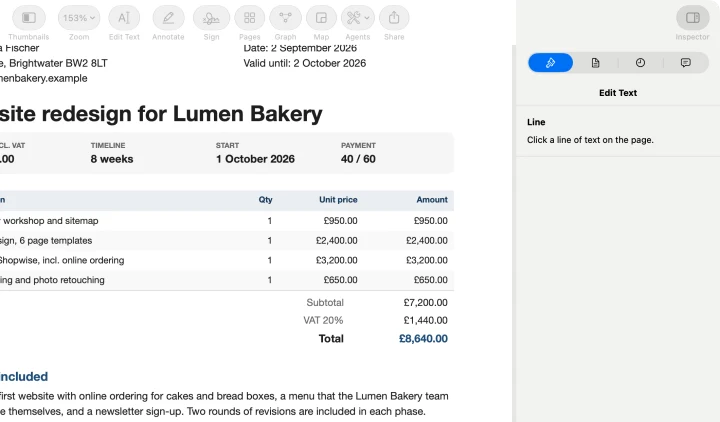
Where it is different is everything around editing, all on your Mac with nothing uploaded: OCR for scans, redaction that finds names, emails and account numbers, PDF to Word and Excel, compress, sign, fill forms, merge and split, on one file or a whole folder at once. It is free, with every agent, and has no subscription. It does not create form fields and has no certificate-based digital signatures.
Good for: freelancers and small businesses who fix, sign, convert and file a lot of PDFs and want a free app with no uploads.
Which PDF editor should you get?
- You add text, sign and fill forms: Preview. Do not pay for anything.
- You change existing text a few times a month: PDFgear (free) or PDF Agents for Mac (free).
- You rewrite PDFs every week: PDF Expert.
- You need OCR, redaction, conversion and batch jobs without paying: PDF Agents for Mac, which is free.
- You need everything, or your clients use Acrobat: Acrobat Pro.
Questions people ask
What is the best free PDF editor for Mac?
Preview, which comes with every Mac, is enough for adding text, signing, filling in forms and page changes. If you need to change words that are already in the PDF, PDFgear is a free Mac app that edits existing text, and LibreOffice Draw is a free, open-source option for simple documents.
Is Preview a PDF editor?
Partly. Preview can add text boxes, highlights, shapes and signatures, fill in forms, redact, and reorder, rotate or delete pages. It cannot change the text a PDF already contains, which is what most people mean by editing a PDF.
Is PDF Expert better than Adobe Acrobat on Mac?
For editing, signing and annotating, PDF Expert is a native Mac app that many people find quicker and it costs less: about $80 a year or about $140 once for the Mac-only lifetime licence. Acrobat Pro ($19.99 a month on an annual plan) adds more advanced tools such as preflight, accessibility checks and Adobe's e-signature workflows, and is the safer choice if your colleagues all use Acrobat.
Which PDF editor for Mac has no subscription?
Preview, PDFgear, LibreOffice and PDF Agents for Mac are free. PDF Expert sells a lifetime licence for the Mac. Adobe sells Acrobat as a subscription, or as Acrobat Pro 2024, a three-year licence paid once.
Do PDF editors for Mac upload my files?
Desktop editors such as Preview, PDF Expert, Acrobat, LibreOffice and PDF Agents edit the file on your Mac. Cloud features (sync, sharing, AI assistants) may send the file to a server when you use them. Online PDF editors upload the file by design.
A free PDF editor for Mac
PDF Agents for Mac: Edit Text, OCR, redaction, Word and Excel export and every other agent, free. Your files never leave your Mac.
PDF Agents for Mac →