Blog ›
How to redact a bank statement (without editing it)
To redact a bank statement, download it as a PDF from online banking, make a copy, and mask the account number, sort code or routing number, card numbers and any transactions the recipient doesn't need, using a tool that removes the text rather than drawing a box over it. Then save under a new name and check that the masked numbers can't be copied out. Preview on a Mac does this for free, and the Redactor does it in the browser without uploading the statement, also free.
The short version
- Ask first. Find out what the landlord, lender or employer actually needs to see.
- Use the PDF from online banking, not a photo: it has real text, so tools can find the numbers.
- Mask, never change. Black out what they don't need; leave every remaining figure exactly as the bank printed it.
- Check the result: select all, copy, paste into a text editor. No masked number should come back.
What should I black out on a bank statement?
Usually hidden:
- the full account number (many banks already print only the last four digits; leave those if the recipient wants to match the account),
- the sort code (UK), routing number (US), IBAN or BIC,
- card numbers, including ones that appear inside transaction descriptions,
- transactions that aren't their business: a pharmacy, a clinic, a donation, a transfer to a family member.
Usually left in: your name, the bank, the statement period, the opening and closing balances and the income lines, because that is what a statement is normally requested for. If the recipient asks for something specific, such as rent payments or salary deposits, leave exactly that visible.
Is redacting the same as editing a bank statement?
No, and the difference matters. Redaction hides information, and the black boxes show that something was removed. Editing changes what the statement says: a balance, a name, a date, a transaction. A statement changed that way is no longer a genuine bank document, and the recipient will treat it as such if they compare it with the bank's records. Never alter a figure, and never use a "PDF editor" to retype one. Only mask.
Also ask before you redact: some lenders and agencies require the full statement and will send a masked one back. Ten seconds of asking saves a second round.
How do I redact a bank statement on a Mac?
- Open the statement in Preview and choose File → Duplicate, so the original stays untouched.
- Choose Tools → Redact. Preview warns that redacted content is removed permanently.
- Drag across the account number, the sort code or routing number and each line you want gone. Use Edit → Find with the last digits of the account number to catch it in headers and footers on every page.
- Save the copy under a new name and close it.
Preview removes the text and keeps the rest of the page searchable. It is manual, so a ten-page statement takes a while. The Redact command is in macOS 11 and later.
How do I redact a bank statement on Windows?
Windows has no built-in redaction. The shapes and highlighter in Edge or the free Acrobat Reader only cover the numbers; they are still in the file. Acrobat Pro's Redact tool works if you have it. PDF24's blacken tool (free) turns the pages into images; the browser tool below flattens them too, without an upload, and it is free. More detail on each in how to redact a PDF.
How do I redact a bank statement without uploading it?
A bank statement is about the last file you want on a stranger's server. The Redactor runs inside the browser tab, so the statement isn't uploaded.
- Open the Redactor and drop the statement PDF.
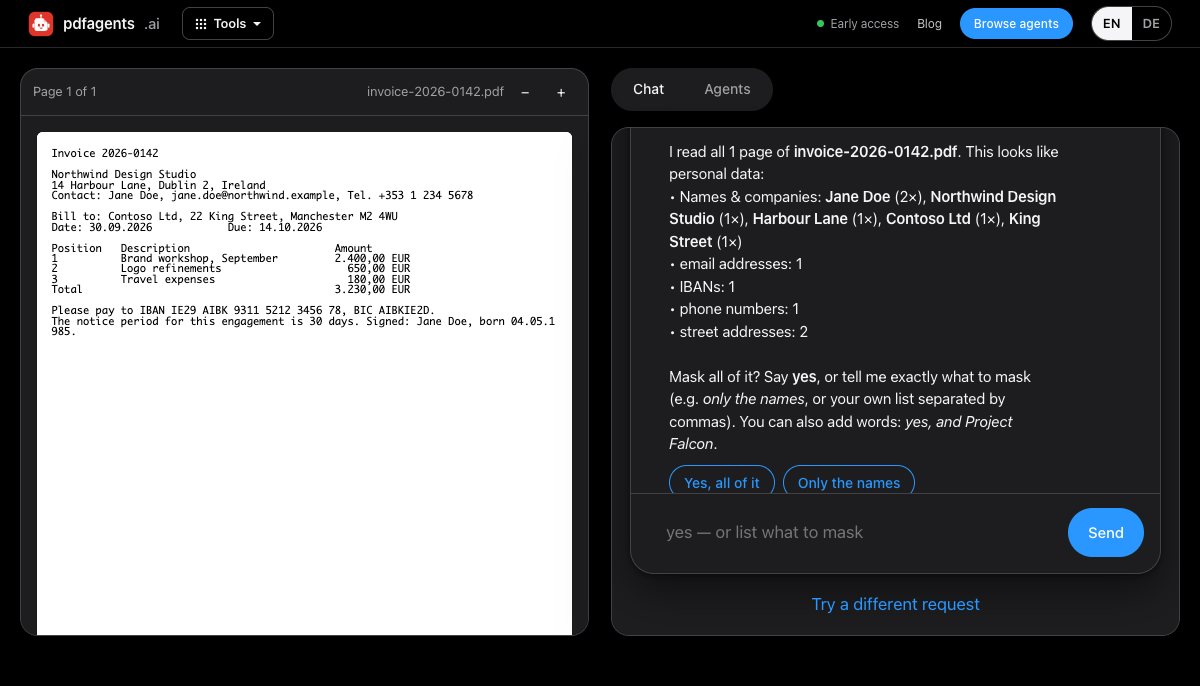
- It scans the pages and lists what it found: names and companies, email addresses, phone numbers, IBANs, card numbers, street addresses and dates of birth.
- Answer yes, or type your own list. Add the account number, sort code or routing number yourself, exactly as printed, plus any merchant names or amounts you want hidden: automatic detection covers IBANs and 13–19-digit card numbers, but not shorter US or UK account numbers. Every occurrence of each item is masked, on every page.
- Pick a plain black box or a label such as [REDACTED], and download. You can add more items and run it again on the same file.
What to know: every page of the result is an image, so the file is larger and no longer searchable; that is why nothing can be copied out of it. It handles statements up to 60 pages. A scanned or photographed statement has no text to find, so run OCR on it first. And detection works from patterns, so look at the list before you say yes.
How do I check that the redaction worked?
- Open the new file, press Ctrl+A (⌘A on a Mac), copy, and paste into a plain text editor. The account number must not appear.
- Search the PDF for the last four digits of the account number and of each card.
- Look at the file's properties: the original file name can include the account number. Strip the metadata if it does, and rename the file.
The full routine is in how to check a redacted PDF. If the statement came password-protected from the bank, remove the password first; to send it on securely, add a new one.
Need the transactions in a spreadsheet rather than a redacted PDF? Bank statement converter compares the ways to turn statements into Excel or CSV without uploading them.
Questions people ask
How do I redact a bank statement?
Download the statement as a PDF from online banking, work on a copy, and use a tool that removes the text or flattens the page: Preview's Tools, Redact on a Mac, or a browser tool such as the pdfagents.ai Redactor. Mask the account number, sort code or routing number and card numbers, save under a new name, then copy and paste the page into a text editor to check that nothing masked comes back.
What should I black out on a bank statement?
Usually the full account number, the sort code or routing number, the IBAN, any card numbers, and transactions the recipient does not need to see. Leave what the recipient asked for, which is often your name, the bank, the statement period, balances and the income lines. Ask them first if you are unsure.
Will a lender or landlord accept a redacted bank statement?
It depends on the recipient. Many accept a statement with the account number masked; some require the full document, for example to verify the account. Ask what they need before you redact, rather than sending a version they will reject.
Is redacting the same as editing a bank statement?
No. Redaction hides information and leaves visible that something was removed. Editing changes what the statement says, such as a balance, a name or a date, and a statement changed that way is no longer a genuine bank document. Never change a figure; only mask it.
Redact a bank statement without uploading it
Drop the PDF, add your account number to the list, download a flattened copy. Nothing leaves your browser. Then run the copy-and-paste check above. Downloads are free.
Open the Redactor →