Blog ›
How to redact a PDF (so the text is really gone)
Redacting a PDF means taking information out of the file, not hiding it under a black box. Some free tools do that and some only draw the box. Here is how to do it properly on a Mac, on Windows, on a phone and in the browser, and how to check that it worked.
The short version
- Work on a copy. Redaction cannot be undone, which is the point.
- Use a tool that removes the text or flattens the page to an image. A black shape drawn on top does neither.
- Mark every occurrence: the name in the header, the footer, the signature line and the file properties, not only the one in the first paragraph.
- Save under a new name, then test the new file: select all, copy, paste into a text editor. If a redacted word shows up, start again with a different tool.
Cover or remove: why the tool matters
A PDF page is a list of drawing instructions. A black rectangle is one more instruction, drawn after the text; the text instruction is still in the file. Viewers show the box, but copy and paste, search, screen readers and AI tools read the text straight through it. This is how court filings and official reports keep leaking names: someone covered the words and never removed them.
Only two methods work. Either the tool deletes the text under the mark, or it turns the page into a picture with the box painted in, so there is no text anywhere. Everything below is one or the other.
On a Mac: Preview (free, built in)
- Open the PDF in Preview and choose Tools → Redact. Preview warns that the content will be removed permanently.
- Drag across the text you want gone. It is shown as a hatched black box.
- Choose File → Export or save under a new name, and close the document.
Preview removes the selected text, and the rest of the page stays searchable. It is manual: you find every occurrence yourself, so search for each name before you save. The Redact command is in macOS 11 and later.
On Windows: no built-in tool
Windows has nothing that redacts. Edge and the free Acrobat Reader can draw shapes and highlights, and those only cover. Printing the covered file with Microsoft Print to PDF does not fix it reliably either, because the printed PDF usually still contains the text.
Options that do work: PDF24 (free), whose blacken tool rebuilds the pages as images, and a browser tool that processes the file on your own machine, described below. If your organisation has Acrobat Pro, use that.
In Acrobat Pro (paid)
- Open All tools → Redact a PDF.
- Mark text or areas by hand, or use Find text and redact to mark every occurrence of a word or a pattern such as email addresses.
- Click Apply. Until you apply, the marks are only marks.
- Accept the offer to remove hidden information, which clears metadata, comments and attachments, and save under a new name.
This is the most complete tool: the text is deleted and the rest of the document stays live. It is part of the paid Pro plan, not the free Reader.
On iPhone and Android
The Markup pen and shapes in the Files and Photos apps cover; they do not remove. We know of no built-in redaction tool on either system. Use a browser tool that works on the device, or do it on a computer. If the document is a photo rather than a PDF, cropping the part out is safer than scribbling over it.
In the browser, without uploading: the pdfagents.ai Redactor
Most online redaction sites need your file on their server, which is an odd place to send a document you are redacting because it is sensitive. The Redactor runs inside the browser tab; the file is not uploaded.
- Drop the PDF on the home page and say remove the personal data.
- It lists what it found: names and companies, email addresses, phone numbers, IBANs, card numbers, addresses and dates of birth. Answer yes, only the names, or give your own list of words.
- Choose a black box or a label, and download.
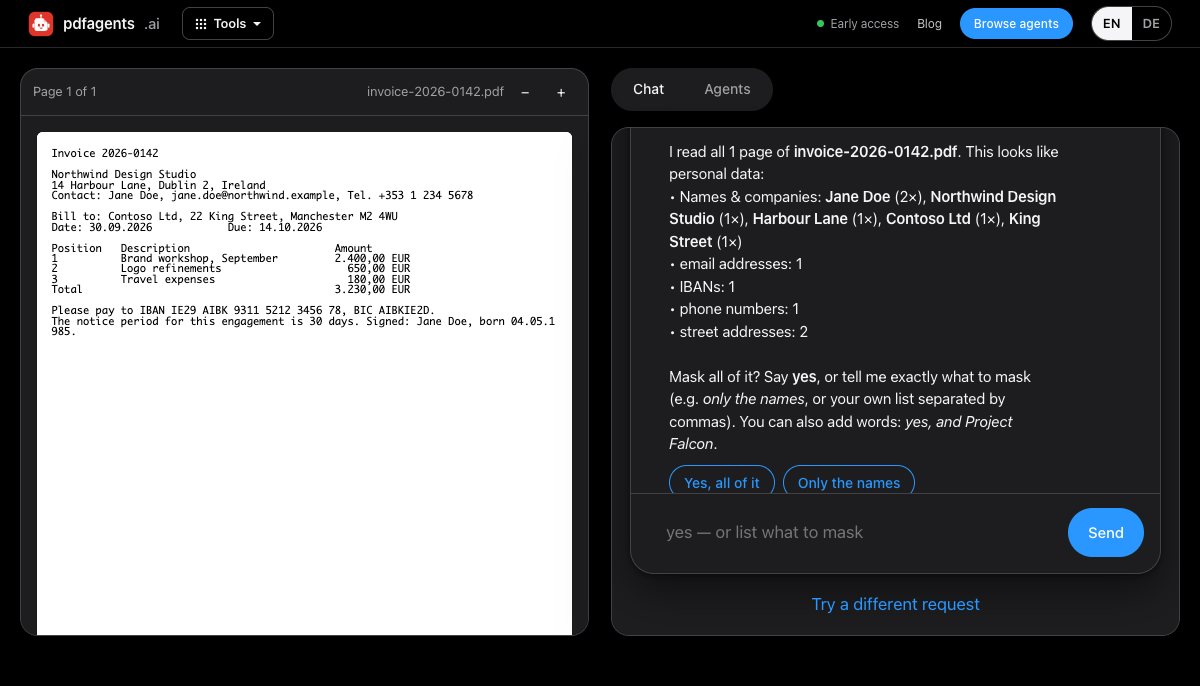
Its limits, plainly. Every page of the result is an image, so the file is larger and no longer searchable; that is the price of there being no text left. Detection works from patterns, so it proposes too much or too little at times, and you add or drop items in the answer. It masks text it can read: a face in a photo, a handwritten note or a signature is not detected, and a scan needs OCR first. For those, Preview or Acrobat, where you draw the area yourself, is the better tool.
What people forget
- Metadata. The author name, the original file name and the software are stored in the file's properties. Check File → Properties, or strip the metadata.
- Every occurrence. Headers, footers, page stamps, email signatures and file names inside the text.
- Comments, attachments and form fields. A sticky note quoting the redacted sentence is still a leak.
- Context. "The CFO of the only bakery in Smalltown" identifies a person without naming them.
- The original. Keep it somewhere safe, and send only the new file. Check the attachment before you press send.
Check the result
Open the redacted file, press Ctrl+A (⌘A on a Mac), copy, and paste into a plain text editor. Then search the PDF for a few of the removed words and for fragments of them. Nothing should come back. The full version, with a third test that reads the file the way software does, is in how to check a redacted PDF. For a side-by-side of the tools, see PDF redaction tools compared.
Questions people ask
How do I redact a PDF for free?
On a Mac, open the PDF in Preview and choose Tools → Redact, then select the text and save. On Windows there is no built-in tool: use PDF24 or a browser tool such as the pdfagents.ai Redactor, which runs on your device, flattens the pages and is free. Whichever you use, test the result by selecting all, copying and pasting into a text editor.
Can I redact a PDF without Adobe Acrobat?
Yes. Acrobat Pro has the best-known Redact tool, but macOS Preview and PDF24 remove the text for free, and the pdfagents.ai Redactor does it in your browser, also free. The free Acrobat Reader cannot redact; drawing a black rectangle with its comment tools only covers the text.
Does drawing a black box over text redact it?
No. A drawn rectangle, a highlighter set to black, or white text leaves the original words in the file, where copy and paste, search and any text extractor will find them. Redaction means the content is removed from the file or the page is turned into an image.
Can a redacted PDF be un-redacted?
If the text was only covered, yes: anyone can copy it out. If it was removed with a real redaction tool, or the page was flattened to an image with the boxes painted on, there is nothing left in the file to recover.
How do I redact a scanned PDF?
A plain scan is a picture, so a box painted into the picture hides what is under it. If the scan has been made searchable it also carries an invisible text layer, which must go too. Either flatten the page after masking, or run OCR first, redact the result, and check it with a text extractor.
Redact a PDF without uploading it
Drop the file, say “remove the personal data”, review the list, download. The pages are flattened, so nothing can be copied out. Then run the test above; we'd rather you check than trust. Downloads are free.
Open the Redactor →