Blog ›
Chat with a PDF for free: ChatGPT, NotebookLM, Claude, and what to do when the file can't be uploaded
“Chat with PDF” has become the most searched way to deal with long documents: upload the file, ask a question in plain English, get an answer. It works, and most of it is free. The part nobody explains is which tool to pick for which document, how to tell a grounded answer from a confident guess, and what to do with the contract or medical letter you are not allowed to upload anywhere.
What “chat with PDF” actually does
The tool extracts the text of your PDF, cuts it into pieces, and when you ask a question it hands the most relevant pieces to a language model together with your question. The model writes an answer from those pieces. Two things follow from this. First, the answer is only as good as the pieces the tool found, which is why long documents and tables trip it up. Second, if the PDF is a scan with no text layer, there is nothing to hand over, and the tool either runs text recognition first or quietly answers from nothing.
The free options, honestly compared
ChatGPT
Upload a PDF in a chat and ask anything. Strongest at follow-ups: “now draft a reply”, “explain this clause to a non-lawyer”. Free tier limits file size and daily use; citations come only if you ask for them (“quote the sentence you base this on”) and are sometimes off by a page.
Google NotebookLM
Built around sources: every statement in an answer links to the passage it came from, and it refuses to answer from outside your documents. The best free choice for studying a set of papers or comparing several proposals. It stays inside Google's ecosystem and is less good at producing polished prose.
Claude
A very large context window means a whole annual report or a long contract goes in at once, and it quotes rather than paraphrases when told to, which matters for numbers, dates and clauses. Free with limits; the paid tier is the one to use for long files.
Gemini
Convenient when the PDF already sits in Google Drive: open it, ask in the side panel. Quality is close to the others; citations are inconsistent.
Dedicated chat-with-PDF sites
ChatPDF, AskYourPDF, Humata and similar: fast, no setup, and most show the source page next to each answer, which is the feature that lets you check. Free tiers cap pages and documents per day. Your file goes to their server and then, usually, to a third-party model provider: two companies rather than one.
How to get answers you can check
- Ask for quotes, not summaries. “Quote the exact sentence about the notice period, with the page number” beats “what is the notice period?”. A quote can be verified in ten seconds; a paraphrase cannot.
- Ask what is missing. “Which of these topics does the document not mention?” exposes the gaps a summary papers over.
- Test the reading. “What is on the last page?” tells you whether the tool read the whole file or stopped at its limit.
- Treat numbers as unverified until you see them. Models round, convert and occasionally invent. Open the page.
When the file must not leave your computer
Every tool above uploads the document. For a client contract, a medical letter, an HR file or anything under an NDA, that is often not allowed, whatever the tool's privacy policy says. Three ways around it:
- A local model. Ollama or LM Studio with a document plugin answers questions with nothing leaving your machine. Slower, weaker on long files, but private by construction.
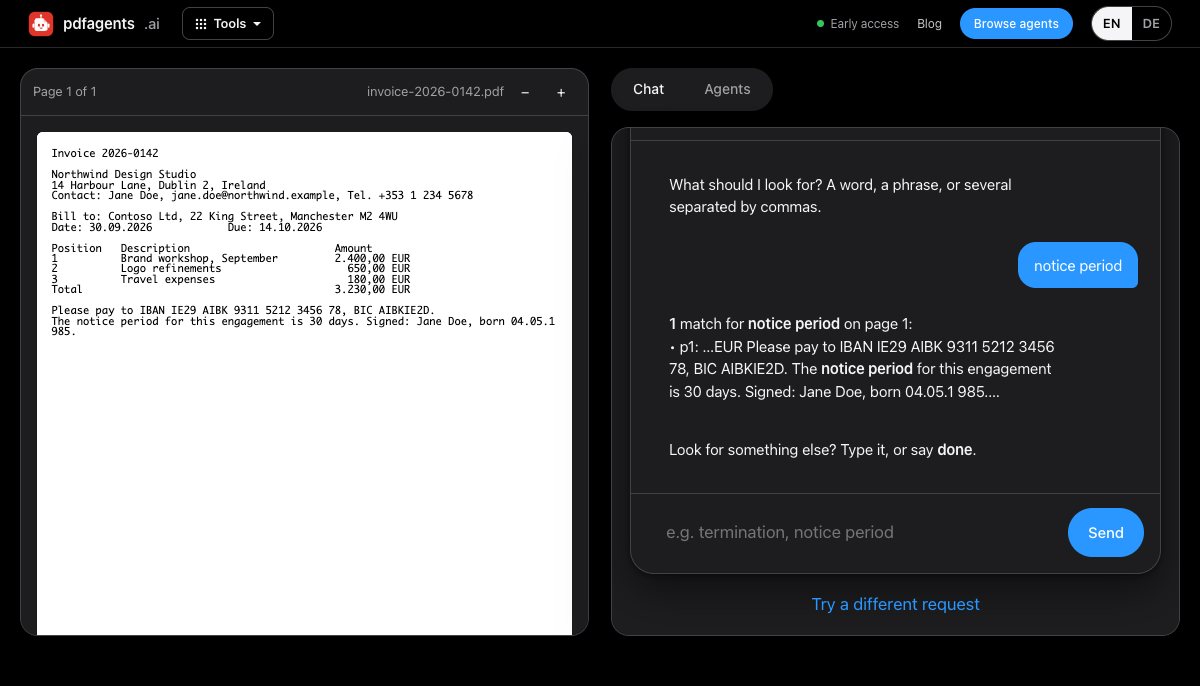
- Search instead of chat. Much of what people ask a PDF chat is really “where does it say X?”. A search that returns every match with its page and the sentence around it answers that without any model, and with no risk of invention. Our Find in PDF tool does exactly this in your browser.
- Prepare the document first. Redact the names and numbers with a tool that runs locally, then upload the cleaned copy to whichever chat you prefer. Our Redactor proposes what to remove and flattens the result so nothing can be recovered.
Which should you use?
- Studying several documents, want citations: NotebookLM.
- One long contract or report, exact wording matters: Claude.
- You want to do something with the answer afterwards: ChatGPT.
- A quick question on one file: a chat-with-PDF site, after reading its privacy policy.
- The file cannot be uploaded: a local model, or search and redact in the browser.
Questions people ask
Is it safe to upload a PDF to ChatGPT?
For public or low-risk documents, yes; OpenAI lets you opt out of training in settings. For documents covered by confidentiality, client privilege or GDPR, the question is not the tool's policy but whether you are allowed to transmit the file at all. Redact first, or use a tool that runs locally.
Can I chat with a scanned PDF?
Only after text recognition. A scan is a picture with no text layer. Run OCR first (pdfagents.ai does this in the browser) and then upload the searchable version, or use a chat tool that OCRs automatically and shows you the recognised text.
Why does the AI give wrong answers about my PDF?
Usually one of three reasons: the file was longer than the tool actually read, the relevant passage was in a table or footnote the extraction dropped, or the model filled a gap with what documents of that kind usually say. Ask for quotes with page numbers to catch all three.
Ask your PDF where it says something, without uploading it
Drop the file, type “where does it say notice period?”, and get every match with page and context. Nothing leaves your browser.
Try Find in PDF →