Blog ›
Compress a PDF for email: get under 10 MB (or 5 MB) without wrecking it
The attachment bounces: “message exceeds 10 MB”. The PDF is 24 MB because someone scanned it at 600 dpi or exported slides with full-resolution photos. Here is what actually makes PDFs big, the ways to shrink one, and how to choose between a smaller file and a readable one.
Why the PDF is big
Text is tiny; a 300-page novel as a PDF is a few hundred kilobytes. Size comes from images: scans, photos, screenshots, logos embedded at print resolution on every page. A scanned page at 600 dpi is 35 megapixels; at 150 dpi, which is plenty for reading on a screen, it is nine times smaller. The second cause is embedded fonts duplicated across merged files, and the third is unused objects left over from editing. Compression that works attacks the images.
Ways to compress
Mac: Preview
File → Export → Quartz Filter → Reduce File Size. Fast and free; the default filter is aggressive and can make scans ugly. For more control, ColorSync Utility lets you build a filter with your own resolution and quality.
Windows: PDF24 Creator or Acrobat Reader's online compressor
PDF24's desktop compressor runs locally with a quality slider. Acrobat's free online tool is convenient but uploads the file.
Any device: in the browser, without uploading
pdfagents.ai compresses in two modes. Light re-saves the file with object streams and keeps the text selectable; it helps with editing leftovers and does nothing for scans. Strong re-renders every page as an image at the quality you pick (print, screen or preview), which is what shrinks scans and photo-heavy decks. It shows the size before and after, and tells you if nothing can be gained rather than handing you a larger file. Downloading the smaller PDF is free.
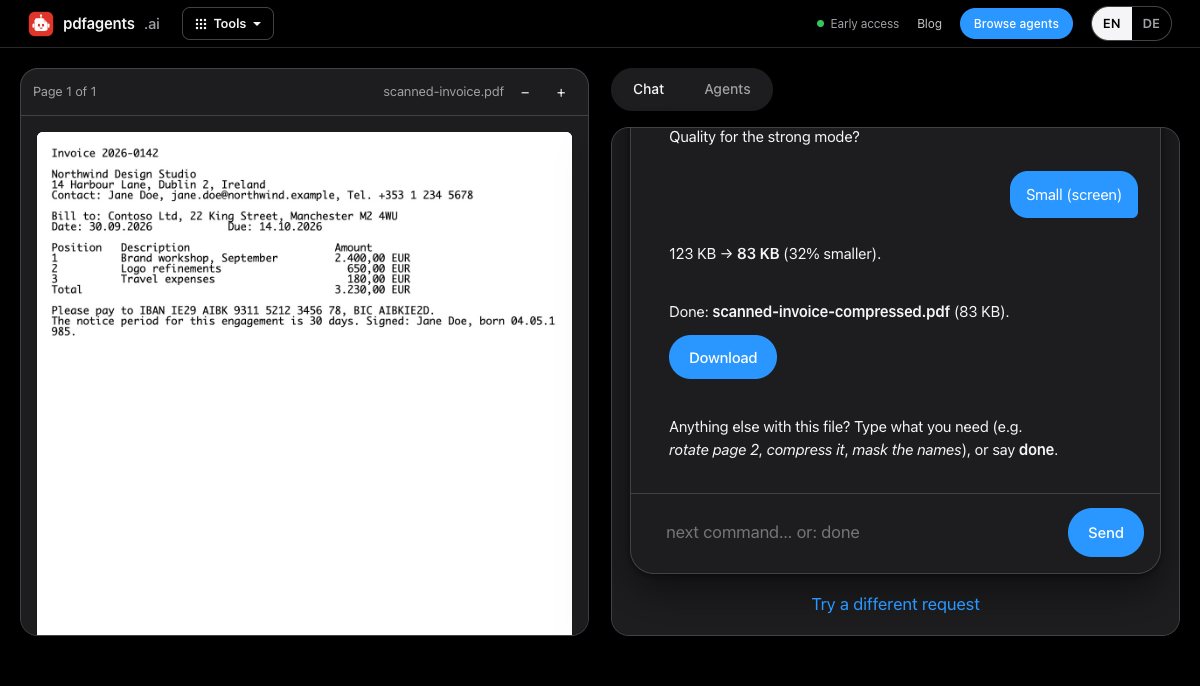
Which mode, which quality
- Mostly text, a few logos: light mode or nothing; the file is probably small already and the bloat is elsewhere (an email signature image, say).
- Scans and photos to be read on screen: strong, “screen” quality. Readable, usually 60–80 % smaller.
- Will be printed: strong, “print” quality, and accept a larger file.
- Just needs to get through a 5 MB gate: strong, “preview”, then check the smallest text is still legible.
What you lose with the strong mode
Pages become pictures. Text can no longer be selected or searched, and screen readers see nothing. If the recipient needs to search or copy, keep the text: use light mode, or compress only the image-heavy pages (split, compress those, merge back), or OCR the result afterwards.
If it is still too big
- Split it and send two emails; or send the pages the recipient actually needs (keep only pages 3-7).
- Lower the scan resolution at the source: 200 dpi is enough for documents.
- For decks, export from PowerPoint or Keynote with “compress images” instead of compressing the PDF afterwards.
- Use a link (Drive, OneDrive, WeTransfer) when the recipient's mail server limit is the problem, not yours.
Questions people ask
How do I compress a PDF to under 10 MB for free?
On a Mac, Preview's Export with the Reduce File Size filter; on Windows, PDF24 Creator; on any device, pdfagents.ai in the browser with the strong mode at screen quality (free, including the download). Scans and photo-heavy files shrink by more than half; pure text files are already small.
Does compressing a PDF reduce quality?
Light compression (re-saving, removing unused objects) loses nothing. Strong compression re-samples the images, so scans become softer; at screen quality this is rarely noticeable when reading, but fine print and small drawings can suffer. Check the smallest text after compressing.
Why did my PDF get bigger after compressing?
Because it was mostly text already. Turning text pages into images makes them larger, not smaller. Use a light re-save instead, or leave the file alone and look for the real cause of the size elsewhere in the email.
Compress a PDF in your browser
Drop the file, say “make this small enough to email”, pick light or strong, see the before and after. Downloads are free.
Compress a PDF →